AI Design Tools & Your Signage: What You Need to Know Before You Hit "Generate"
AI-powered design tools are everywhere right now. From logo makers to full brand kits, platforms like Canva AI, Adobe Firefly, and countless others promise professional-looking results in seconds — and often for free. For business owners watching their budgets, that's tempting. But when it comes to signage, vehicle wraps, and branded materials that need to be physically produced, there's a critical gap between what AI delivers and what the production process actually requires.
As a sign company that builds everything from dimensional lettering to large-format graphics, we see the results of AI-generated design files every week. Some are surprisingly good starting points. Others cost our clients more in rework than a professional designer would have charged in the first place.
Here's an honest breakdown.
Where AI Design Gets It Right
Speed and accessibility. AI tools let you explore ideas quickly. Need to see what a rustic look versus a modern look might feel like for your new café? You can generate dozens of concepts in minutes. For early-stage brainstorming, that's genuinely useful.
Low barrier to entry. Not every startup has the budget for a branding agency on day one. AI tools give small business owners a way to visualize ideas and start building momentum without a large upfront investment.
Inspiration and iteration. AI is excellent at generating options. It can help you identify color directions, layout styles, and general aesthetics that you can then hand off to a professional for refinement.
Where AI Design Falls Short for Signage
This is where things usually break down.
1. Image files vs. production-ready files
Most AI tools give you image files (like JPGs or PNGs). These are made of pixels—tiny dots that look fine on a screen but don’t scale well.
Sign production requires vector files.
A vector file is built from mathematical lines and shapes, not pixels. That means it can be resized from a small decal to a building sign without getting blurry.
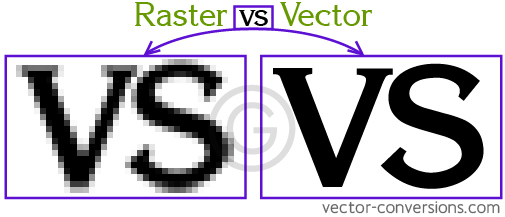
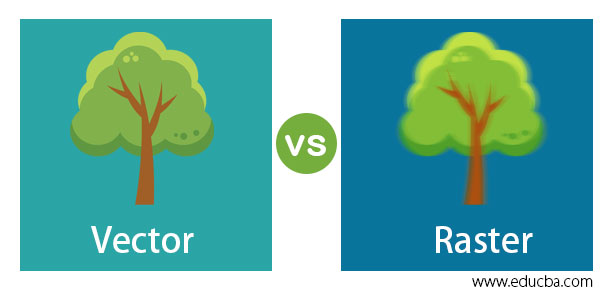
If we receive a pixel-based AI logo and need to cut it out of metal, acrylic, or vinyl, we usually have to rebuild it from scratch, which adds time and cost.
2. Fonts that aren’t actually fonts
In professional design, text is created using specific fonts (also called typefaces). Knowing the exact font matters because it needs to match across your website, signs, vehicles, and printed materials.
AI designs often turn text into a picture of letters, not editable text. That means:
We can’t easily change a phone number or address
Matching the text later becomes guesswork
Your branding can start to look inconsistent over time
3. Colors that change when printed
Colors on a screen don’t always look the same when printed or fabricated.
Professional branding uses defined color values, such as:
Pantone (a standardized color system)
CMYK (used for printing)
RGB (used for screens)
AI tools don’t usually specify these. So a red that looks great on your monitor may look darker, duller, or completely different once it’s printed on vinyl or cut from colored material.
4. No understanding of how signs are made
AI doesn’t know:
How thin is too thin to cut from metal
That tiny details may fill in with paint
That certain shadows or effects can’t be physically built
How far away the sign will be viewed
Good sign design considers materials, fabrication methods, and visibility. AI designs don’t account for any of that, which can lead to signs that look good digitally but don’t work physically.
5. A logo image isn’t a full brand
A usable brand includes:
Multiple logo versions (horizontal, stacked, simplified)
Defined colors
Approved fonts
Rules for spacing and usage
AI usually gives you one image. That’s not a brand system—it’s just a starting point. Without structure, your brand can quickly look inconsistent across signs, vehicles, and marketing materials.
The Bottom Line
AI design tools are not the enemy. They're useful, they're improving rapidly, and they absolutely have a place in the creative process — particularly in the brainstorming and concept stages.
But for any business that needs physical signage, branded environments, or production-ready materials, AI-generated files are almost never ready to go as-is. The files lack vector structure, font data, color specifications, and fabrication awareness — all things that a skilled human designer builds into the work from the start.
Our recommendation: Use AI to explore and get inspired. Then bring those ideas to a professional who understands production requirements and brand consistency. The investment in properly built files pays for itself the very first time you need to reproduce your logo at a different size, on a different material, or through a different vendor — and it looks exactly right.
Until AI tools evolve to deliver true production-ready, brand-system output, the human designer isn't just a nice-to-have. They're the difference between a picture of a logo and a logo that actually works.